Bedrock cost breakdown by IAM tag
Amazon Bedrock bills per token, but the bill does not say which team sent the tokens. When several applications share one AWS account, Bedrock spend collapses into a single line. CloudPouch splits that line by IAM principal tag, so a $10,000 Bedrock month becomes “$6,200 team-search, $2,900 team-assistant, $900 untagged” instead of a number nobody owns.
What CloudPouch shows
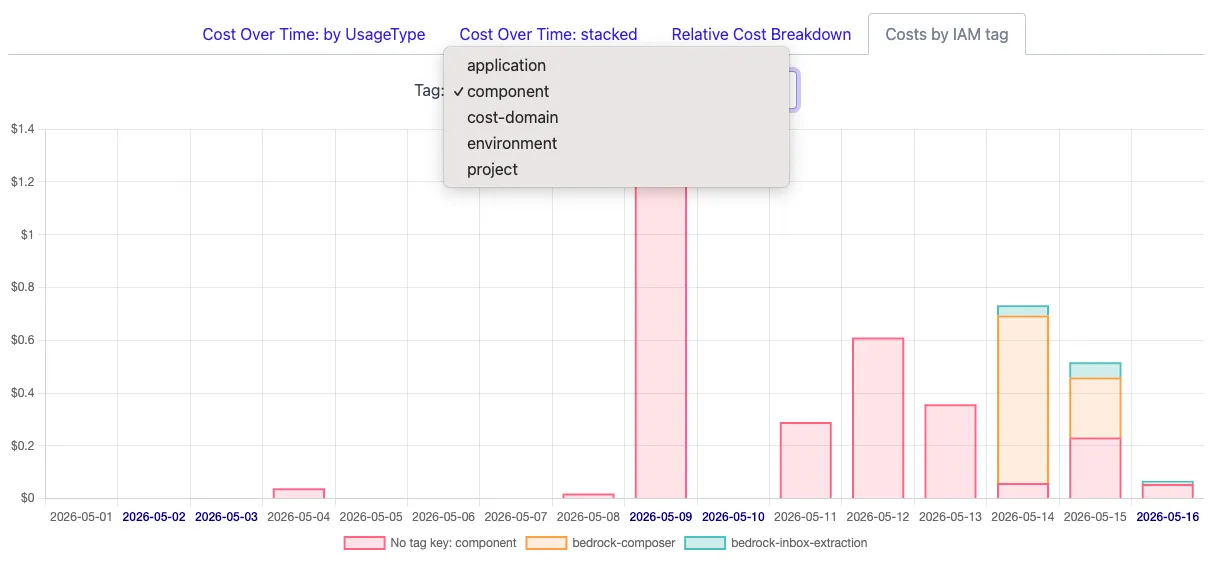
Section titled “What CloudPouch shows”For Claude model rows backed by Amazon Bedrock, CloudPouch adds a Costs by IAM tag tab to the service drill-down:
- A tag selector to switch between your activated IAM principal tag keys — team, department, cost center, project, or whatever low-cardinality keys you use.
- A stacked bar chart of daily or monthly cost per tag value, with per-region filtering.
- A visible no-tag bucket: untagged calls are grouped and shown, not hidden, so unattributed spend stays on the radar until someone tags the caller.
- Noise control: series below 0.01 USD are filtered out automatically.
CloudPouch queries Cost Explorer sequentially and tolerates partial failures, so one rejected service/tag combination does not break the whole breakdown.
Why attribution is the Bedrock cost problem
Section titled “Why attribution is the Bedrock cost problem”Bedrock charges per input and output token, and per-token prices differ by model — a workload quietly switched to a larger model can multiply its cost without any traffic change. None of that is actionable until you know who is spending: you cannot ask a team to tune prompts, cache responses, or pick a smaller model if the bill cannot name the team. IAM principal tags are the mechanism AWS provides for this — each calling role carries tags, and cost allocation data can carry them into billing.
Prerequisites in AWS
Section titled “Prerequisites in AWS”The view is only as good as your cost allocation setup:
- IAM principal tags must be activated as cost allocation tags in the Billing console (they appear as
iamPrincipal/<key>). - Include caller identity (IAM principal) allocation data must be enabled on your CUR 2.0 export in Data Exports — allow up to 24 hours for AWS to backfill after enabling it.
- Tag your calling IAM roles with low-cardinality keys (team, cost center, project). One shared gateway role reused by many teams collapses everyone into a single bar — give each team its own role or tag if you want per-team numbers.
The full setup walkthrough is in Attribute Bedrock spend by team.
How to read the result
Section titled “How to read the result”Start with the biggest bars and the no-tag bucket. A large untagged share means the attribution work is not done yet; a single dominant tag value in a multi-team account usually means a shared role. Once every bar has an owner, per-team optimization conversations become possible.
Required AWS permissions
Section titled “Required AWS permissions”CloudPouch needs read-only access to cost data and the IAM tag context used for attribution. See AWS permissions.