How to attribute Amazon Bedrock spend by application or team
When several teams call Amazon Bedrock from one shared AWS account, the bill shows one number and no owners. CloudPouch breaks that number apart by IAM principal tags — team, project, cost center, environment — so you can see who spends what on Claude and other Bedrock models, and how much usage has no owner at all.
Why Bedrock spend is hard to attribute
Section titled “Why Bedrock spend is hard to attribute”Bedrock is usually consumed through IAM roles, not per-team accounts. Ten applications calling the same model through the same account produce one undifferentiated cost line. The ownership signal that does exist is in IAM: the tags on the roles and users making the calls. AWS can expose those tags in cost data — but only if you activate them as cost allocation tags first, and most accounts never do until someone asks “who spent this?”
Prerequisites
Section titled “Prerequisites”- IAM principals (roles and users) making Bedrock calls carry meaningful tags — low-cardinality keys such as
team,project,department, orcost-centerwork best. - Those tag keys are activated as cost allocation tags in Billing and Cost Management → Cost Allocation Tags (they appear as
iamPrincipal/<key>). Attribution can only be as good as the tagging underneath it. - Include caller identity (IAM principal) allocation data is enabled on your CUR 2.0 export in Data Exports. Allow up to 24 hours for AWS to backfill the data after enabling it.
Step-by-step
Section titled “Step-by-step”- Open CloudPouch and select the AWS profile for the account with Bedrock spend.
- Select Current Month or Previous Month.
- Open the Claude model row backed by Amazon Bedrock in the service drill-down.
- Open the Costs by IAM tag tab (available since CloudPouch v1.46.0).
- Pick a tag key in the tag selector — for example
application,environment, orproject. - Read the stacked bar chart: each bar is a day or month, each segment a tag value’s share of Bedrock cost. Filter per region if you need to localize the spend.
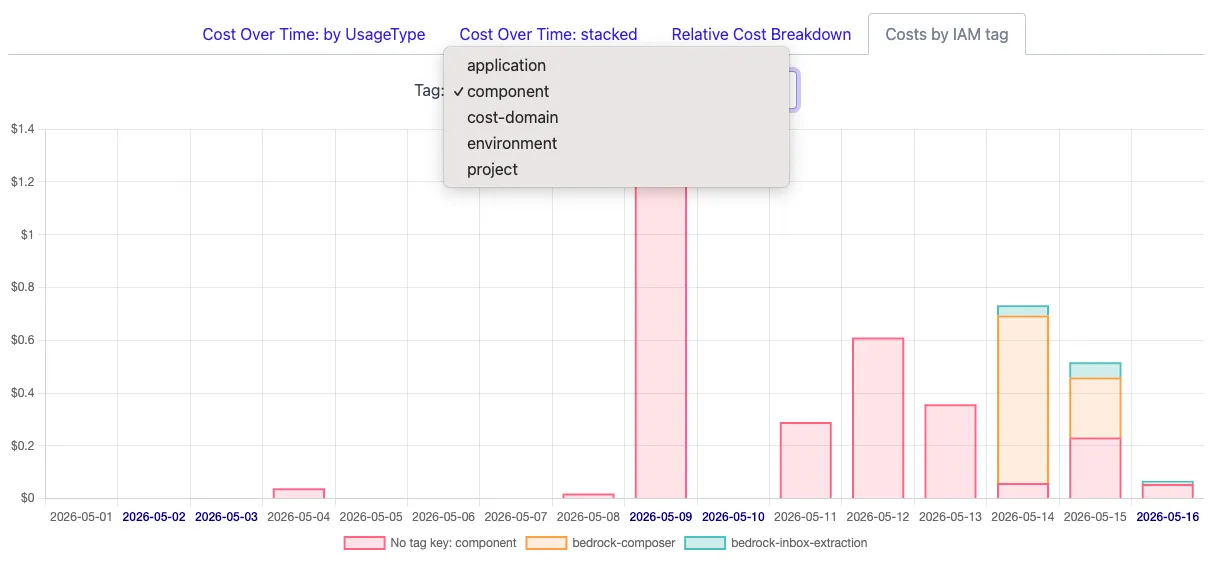
Untagged calls are grouped under a visible no-tag bucket rather than hidden — a large no-tag segment is itself a finding, telling you which share of Bedrock spend currently has no accountable owner. Series below $0.01 are filtered out automatically so the chart stays readable.
Reading the result
Section titled “Reading the result”- One tag value dominates: you have your conversation partner. Take the chart to that team before the next month closes.
- The no-tag bucket dominates: fix tagging first. Attribution work done before tags exist just gets redone.
- Everything collapses into a single bar: you likely have a shared gateway — many teams calling Bedrock through one IAM role. The role’s tags describe the gateway, not the callers. To attribute further you need per-team roles or application-level tracking in the gateway itself.
If one service/tag combination is rejected by Cost Explorer (a permissions or activation gap), CloudPouch skips it and keeps the rest of the breakdown intact rather than failing the whole view.
Related pages
Section titled “Related pages”- Bedrock cost breakdown by IAM tag
- AWS permissions — includes the IAM tag read actions this view uses.
- Troubleshooting