How to find Amazon EKS Extended Support costs in AWS
If any of your Amazon EKS clusters runs a Kubernetes version older than roughly 14 months, you are probably paying the Extended Support surcharge for it — a per-cluster-hour rate several times higher than the standard EKS cluster fee. CloudPouch shows exactly which clusters are affected and what each one costs you per month.
Why this charge appears
Section titled “Why this charge appears”Each Kubernetes minor version gets about 14 months of standard support on Amazon EKS. After that, a cluster with the default Extended Support upgrade policy is enrolled automatically and pays a higher per-cluster-hour price for roughly another year of security patches — while a cluster set to the Standard upgrade policy is auto-upgraded at the deadline instead and never pays the surcharge. There is no approval step and no separate invoice line screaming about it: the surcharge lands inside your EKS spend, per cluster, every hour, until you upgrade.
That combination — automatic enrollment plus blended billing — is why teams routinely discover Extended Support months after it started. Check the Amazon EKS pricing page for the current standard and extended rates.
Find affected clusters with CloudPouch
Section titled “Find affected clusters with CloudPouch”- Open CloudPouch and select the AWS profile for the account you want to check.
- Run Cost Insights for the account — a bulk analysis (
Cmd/Ctrl + Enter) covers every eligible service, including EKS Extended Support Detection (available since CloudPouch v1.42.0). - Open the EKS Extended Support result: each affected cluster with its AWS Region, Kubernetes version, Extended Support status, when it entered Extended Support, and the estimated monthly support charge.
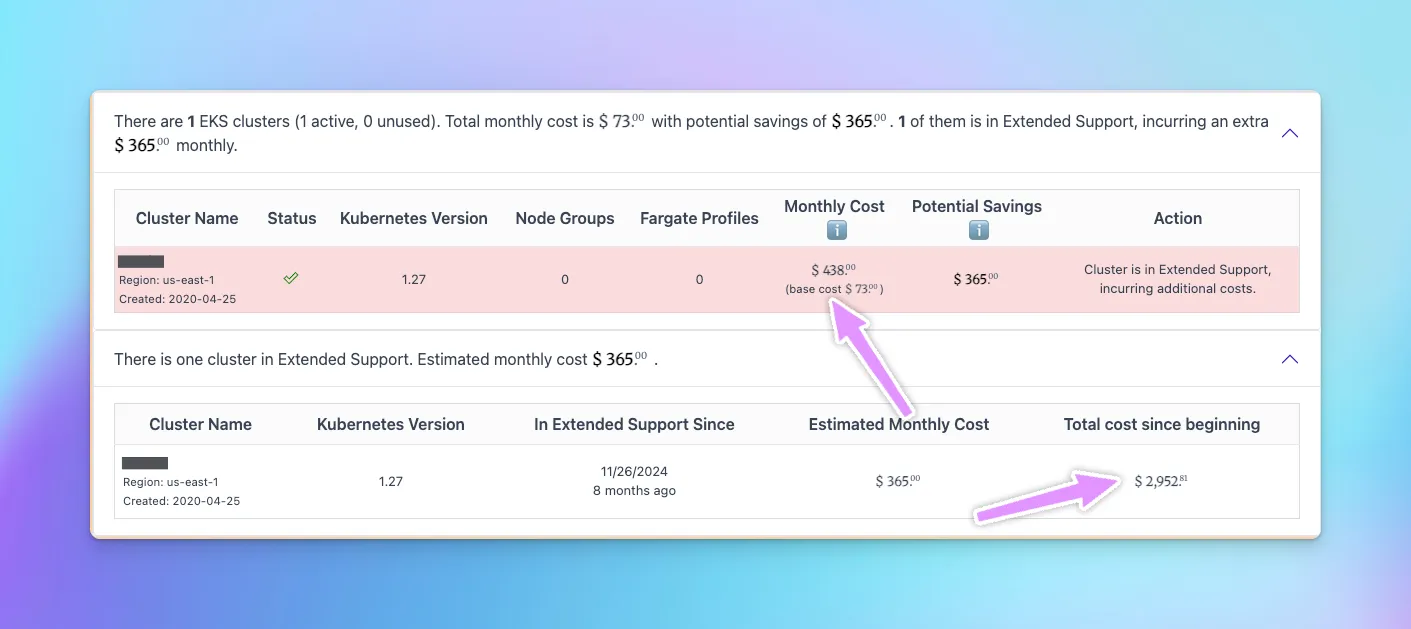
Because CloudPouch shows when each cluster entered Extended Support, you can also estimate how much the surcharge has already cost — useful when you need to justify upgrade work to management.
How to read the result
Section titled “How to read the result”- A cluster in Extended Support is paying the surcharge right now. Upgrading its Kubernetes version to a standard-support release stops the extra charge.
- Multiple small clusters can hurt more than one big one: the surcharge is per cluster-hour, not per node, so a dozen barely-used dev clusters on an old version pay it twelve times over.
- Estimated dollar amounts are pricing-sensitive. Verify current AWS EKS pricing before you put a number into a budget commitment.
What to do next
Section titled “What to do next”Sort by monthly cost and start with the most expensive clusters, but plan the actual upgrades with the workload owners — Kubernetes version upgrades touch API deprecations, add-on compatibility, and node group rollout, so the cheapest cluster to upgrade is not always the cheapest cluster on the bill. For clusters nobody claims, Extended Support charges are a strong signal the cluster itself may be waste.
Related pages
Section titled “Related pages”- EKS Extended Support Detection
- How to find Amazon RDS Extended Support costs — the same trap exists for database engines.
- AWS permissions
- Troubleshooting