ELB Cost Insights
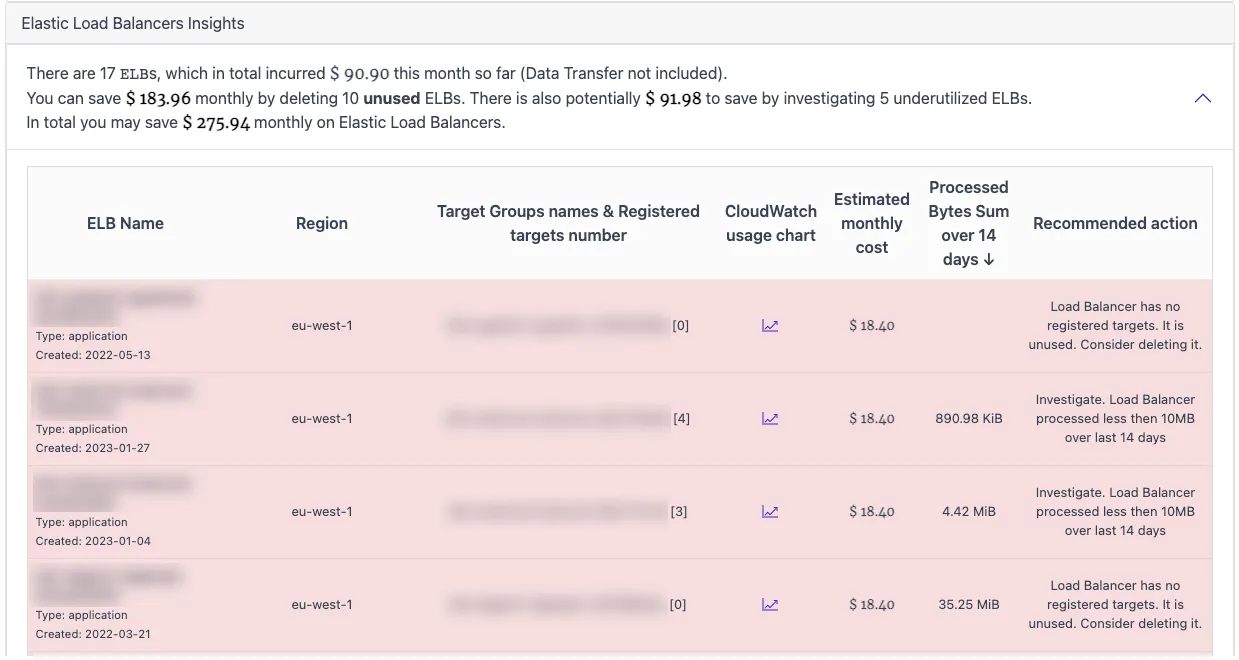
A load balancer with an empty target group serves nothing and still bills every hour. CloudPouch ELB Cost Insights find Elastic Load Balancing resources that outlived the applications behind them, so you can delete them instead of paying for routing to nowhere.
What CloudPouch checks
Section titled “What CloudPouch checks”- Unused load balancers with no meaningful traffic.
- Load balancers whose target groups contain no EC2 instances — the clearest signal that the workload behind the balancer was removed.
- Actual traffic, using CloudWatch metrics such as
ProcessedBytes, so a balancer that is technically configured but effectively idle still gets flagged.
The analysis covers Application and Network Load Balancers; Classic Load Balancers are not analyzed. Each finding includes the estimated monthly cost, so you know what deleting the resource is worth before you open the AWS console.
Why this costs money
Section titled “Why this costs money”Every Application, Network, and Classic Load Balancer bills a fixed hourly charge from the moment it is created until it is deleted — traffic only adds to that (capacity-unit charges on ALB and NLB, per-GB data charges on Classic), it never reduces it. Zero requests still means a full hourly bill, twenty-four hours a day. Load balancers are also a classic orphan: infrastructure teardown scripts delete the instances and forget the balancer, or a migration moves traffic to a new balancer and nobody removes the old one. Each forgotten balancer is a small, flat, permanent line in the bill — and accounts that have been around a few years usually have several. Current hourly rates are on the Elastic Load Balancing pricing page.
When to use it
Section titled “When to use it”Run this insight after decommissioning applications, after blue/green or migration cutovers, and periodically in any long-lived account. Empty target groups are the fastest wins: there is nothing behind the balancer, so deletion is usually safe once you confirm no DNS records still point at it.
How to act on findings
Section titled “How to act on findings”Before deleting, check whether any Route 53 records, CloudFront origins, or hard-coded DNS names still reference the balancer. A balancer with zero ProcessedBytes over the analysis window and an empty target group is a delete candidate; a low-traffic balancer with healthy targets may instead be a consolidation candidate.
Required AWS permissions
Section titled “Required AWS permissions”CloudPouch needs read-only access to Elastic Load Balancing metadata, CloudWatch metrics, and cost data. See AWS permissions.