AWS permissions
CloudPouch needs read-only AWS permissions: ce:GetCostAndUsage for billing data, plus describe/list actions for the resources each Cost Insight inspects. The full policy is below — copy it as-is, or trim it to the insights you actually run.
CloudPouch installs nothing in your AWS account. There is no agent, no Lambda function, no cross-account role to deploy. Everything runs from your desktop through the same AWS APIs the AWS CLI uses, authenticated by your local AWS profile.
Read-only baseline policy
Section titled “Read-only baseline policy”Attach this policy to the IAM user, role, or SSO permission set behind the AWS profile you select in CloudPouch:
{ "Version": "2012-10-17", "Statement": [ { "Sid": "CloudPouchMinimalAccess", "Effect": "Allow", "Action": [ "application-autoscaling:DescribeScalableTargets", "ce:GetCostAndUsage", "cloudwatch:GetMetric*", "dynamodb:DescribeTable", "dynamodb:ListTables", "ecr:DescribeImages", "ecr:DescribeRepositories", "ec2:Describe*", "ebs:ListSnapshotBlocks", "ebs:ListChangedBlocks", "eks:DescribeCluster", "eks:ListClusters", "elasticfilesystem:DescribeFileSystems", "elasticfilesystem:DescribeLifecycleConfiguration", "elasticfilesystem:DescribeMountTargets", "elasticloadbalancing:DescribeLoadBalancers", "elasticloadbalancing:DescribeTargetGroups", "elasticloadbalancing:DescribeTargetHealth", "glue:GetCrawlers", "glue:GetJobs", "glue:GetJobRuns", "iam:GetRole", "iam:GetUser", "iam:ListRoleTags", "iam:ListRoles", "iam:ListUserTags", "iam:ListUsers", "lambda:GetFunctionConfiguration", "lambda:ListFunctions", "logs:DescribeLogGroups", "organizations:ListAccounts", "rds:DescribeDBClusters", "rds:DescribeDBInstances", "rds:DescribeDBSnapshots", "s3:GetBucketLifecycleConfiguration", "s3:GetBucketLocation", "s3:GetBucketTagging", "s3:GetIntelligentTieringConfiguration", "s3:ListAllMyBuckets" ], "Resource": "*" } ]}Every action is a read: Get*, List*, or Describe*. Nothing in this policy lets CloudPouch create, modify, or delete a resource — when a Cost Insight recommends deleting an unattached EBS volume, you make that change yourself, with your own credentials and your own change process.
This policy extends the minimal policy from the CloudPouch user guide (last changed for CloudPouch 1.24.0) with the read actions used by Cost Insights added since then — EKS, EFS, Lambda, ECR, Glue, S3, and the IAM tag reads used by the Bedrock cost breakdown. If you only run a few insights, you can remove the action families for services you never analyze. And if a newer insight ever needs an action beyond this list, CloudPouch’s permission issue details (below) name the missing action exactly.
What each action group is for
Section titled “What each action group is for”ce:GetCostAndUsage— the core action. It fetches your billing data from Cost Explorer and powers the cost breakdown, reports, and every dollar figure CloudPouch shows.organizations:ListAccounts— resolves account IDs to account names when you analyze a payer (management) account in AWS Organizations. Skip it for standalone accounts.ec2:Describe*— EC2, EBS, Elastic IP, NAT Gateway, and VPC endpoint insights.ebs:ListSnapshotBlocks/ebs:ListChangedBlocks— let the EBS Snapshot insight measure how much unique data each incremental snapshot actually holds.dynamodb:DescribeTableanddynamodb:ListTables, withapplication-autoscaling:DescribeScalableTargets— DynamoDB over-provisioning analysis compares provisioned capacity against consumed capacity metrics.cloudwatch:GetMetric*— coversGetMetricStatisticsandGetMetricData, the utilization metric reads behind DynamoDB, RDS, and other usage-based checks.rds:DescribeDBClusters,rds:DescribeDBInstances, andrds:DescribeDBSnapshots— RDS and DocumentDB insights, including Extended Support detection.- The
elasticloadbalancing:Describe*actions (load balancers, target groups, target health) — find load balancers with no healthy targets. logs:DescribeLogGroups— CloudWatch Logs storage and retention analysis.iam:List*/iam:Get*— read IAM principal tags so Bedrock spend can be attributed per team or project. These actions read identity metadata and tags, never credentials.
Why ec2:Describe* is a wildcard
Section titled “Why ec2:Describe* is a wildcard”A surprising amount of AWS networking bills through the EC2 API namespace: EBS volumes, EBS snapshots, Elastic IPs, NAT Gateways, and VPC endpoints are all ec2:Describe* calls. Enumerating them individually produces a long, brittle list that breaks whenever a Cost Insight starts reading one more field. The wildcard keeps the policy stable, and since every ec2:Describe* action is read-only, it does not widen write access.
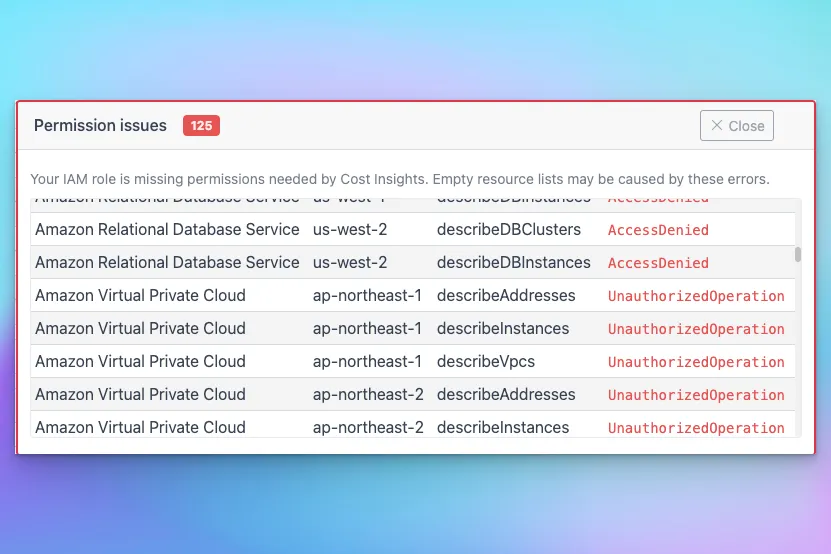
If your security review requires explicit actions anyway, run the Cost Insights you need with a candidate policy and use CloudPouch’s permission issue details (service, region, API operation, error code) to find what is missing. Test the narrowed policy before rolling it out to teammates.
Optional CloudFormation helper
Section titled “Optional CloudFormation helper”The CloudPouch user guide provides an optional CloudFormation launch link that creates the IAM policy for you: a stack named CloudPouch-access-policy-stack that creates a policy named CloudPouch-costs-policy, ready to attach to an IAM user or role.
This is a one-time setup convenience, not runtime infrastructure — CloudPouch never requires anything deployed in your account to operate.
When a permission is missing
Section titled “When a permission is missing”CloudPouch does not fail silently. When an insight hits AccessDenied or OptInRequiredException, it reports the affected service, region, API operation, and AWS error code, so you know exactly which IAM action to add.