RDS Cost Insights
An RDS database nobody queries anymore still bills every hour for its instance and every GB-month for its storage — and if its engine version has aged past standard support, AWS adds an Extended Support surcharge on top. CloudPouch RDS Cost Insights find all three problems in one scan.
What CloudPouch checks
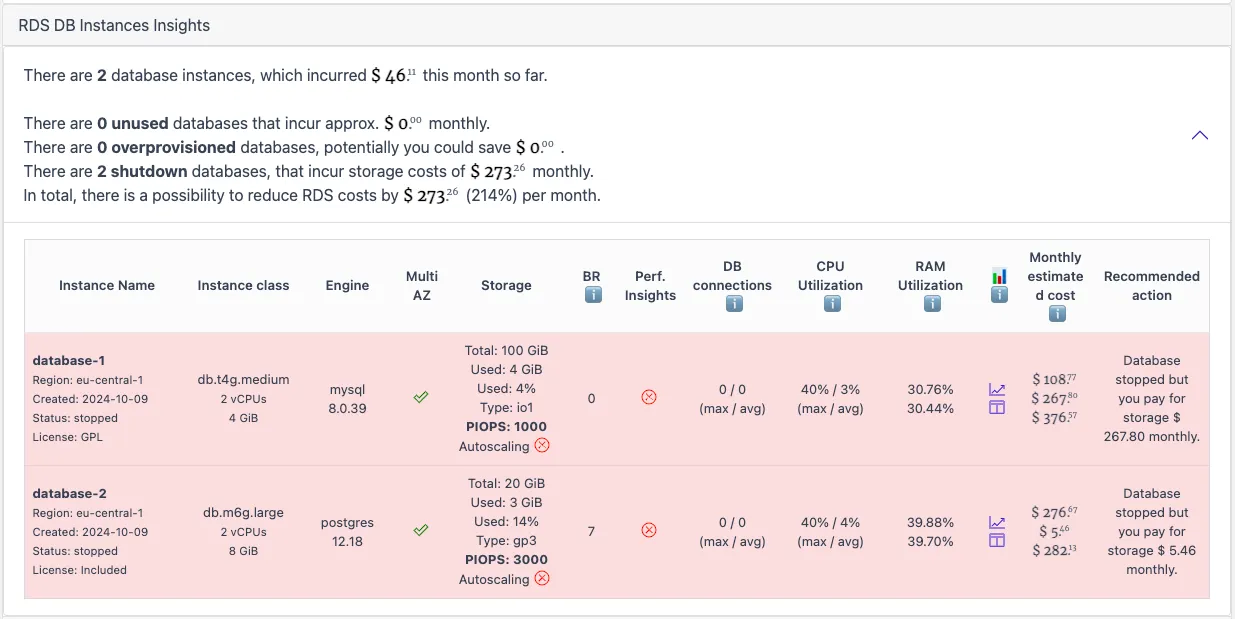
Section titled “What CloudPouch checks”- Unused databases that still incur instance and storage costs.
- Over-provisioned DB instances where utilization does not justify the instance size.
- Storage autoscaling and disk utilization issues, with storage cost calculated for GP3, IO1, and IO2 Provisioned IOPS configurations.
- Shutdown instance savings as a separate savings category.
- Failed databases flagged as a distinct condition.
- RDS Extended Support exposure — both databases already enrolled and databases that will enter Extended Support within the next 12 months.
Results include database creation dates and links to CloudWatch metrics so you can verify a finding before acting. Aurora Serverless clusters appear in the summary views.
Why this costs money
Section titled “Why this costs money”RDS bills several meters independently. The instance bills per hour whether the database serves one query or one million. Provisioned storage bills per GB-month regardless of how much data actually sits on disk, and Provisioned IOPS (IO1/IO2) add a separate per-IOPS charge. Even a stopped RDS instance keeps billing for storage — and AWS automatically restarts stopped instances after seven days.
Extended Support is the meter people miss: when an engine version (for example, an older MySQL or PostgreSQL major version) passes its standard support end date, AWS enrolls the database automatically and charges a per-vCPU-hour surcharge — and the rate steps up again in the third year. Enrollment happens unless you disable Extended Support in the database’s engine lifecycle settings, in which case AWS upgrades the engine automatically at the deadline instead. See the Amazon RDS Extended Support pricing page for current rates.
Reading Extended Support findings
Section titled “Reading Extended Support findings”For each affected database, CloudPouch shows the engine and version, whether it is already enrolled or approaching enrollment, the current monthly support cost, the cumulative support cost since enrollment, and the future monthly cost if nothing changes. Use these numbers to rank upgrades: a database that has quietly accumulated months of surcharges usually deserves a slot in the next sprint. Weigh application compatibility and operational risk before upgrading — the finding tells you what the delay costs, not whether the upgrade is safe.
The step-by-step walkthrough is in Find RDS Extended Support costs.
Required AWS permissions
Section titled “Required AWS permissions”CloudPouch needs read-only access to RDS metadata, CloudWatch metrics, and cost data. See AWS permissions.