EKS Extended Support Detection
When an Amazon EKS cluster’s Kubernetes version ages past standard support, AWS moves it to Extended Support by default and multiplies the per-cluster-hour fee — a charge that hides inside your aggregate EKS spend unless you know to group Cost Explorer by usage type. CloudPouch detects these clusters and puts the support fee next to the cluster that caused it.
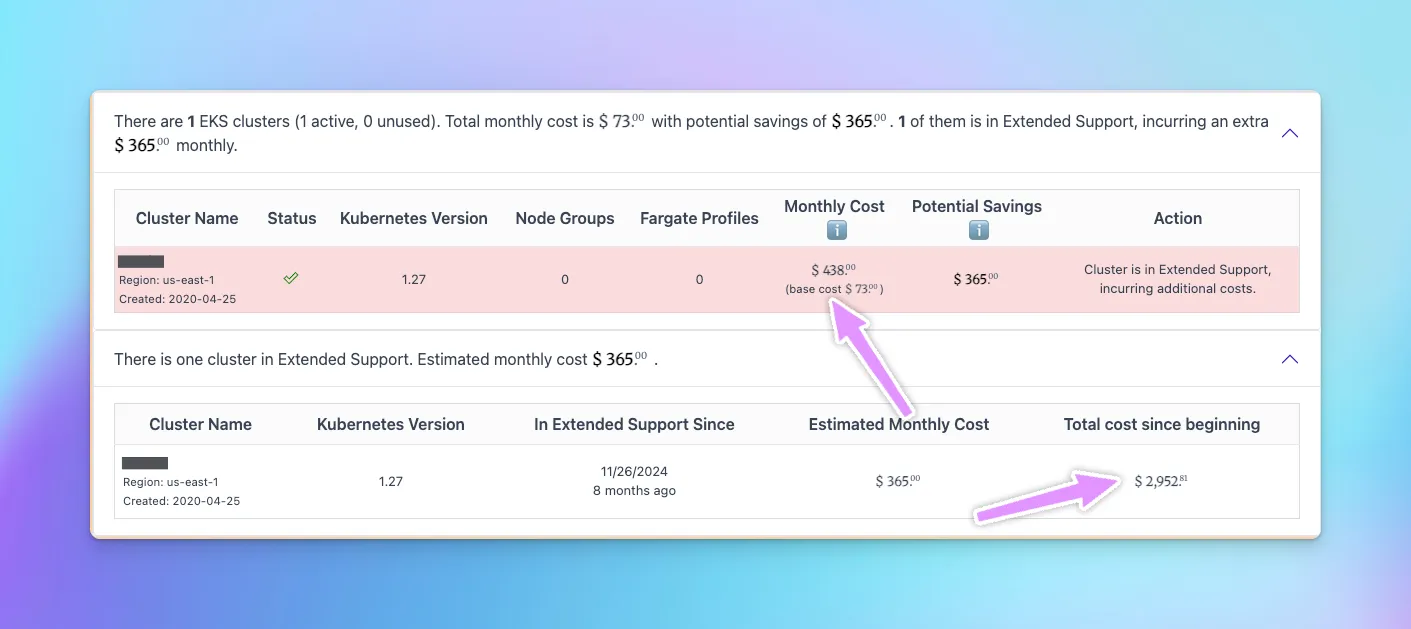
What CloudPouch shows
Section titled “What CloudPouch shows”For each affected cluster, CloudPouch lists:
- The cluster and its AWS Region.
- The Kubernetes version that triggered Extended Support.
- Whether the cluster is currently in Extended Support.
- When the cluster entered Extended Support.
- The estimated monthly support charge, plus historical charge context, so you can see what the delay has already cost.
CloudPouch combines EKS cluster metadata with your billing data to identify enrolled clusters and what they are actually charged.
Why this costs money
Section titled “Why this costs money”Each Kubernetes minor version gets a standard support window on EKS (roughly 14 months from release). After that, a cluster whose upgrade policy is set to Extended Support — the default — is enrolled automatically and billed a per-cluster-hour rate several times the standard cluster fee, for every hour, for up to another 12 months; at the end of that window AWS upgrades the control plane automatically. Clusters set to the Standard upgrade policy skip the surcharge entirely: AWS auto-upgrades them at the end of standard support instead. As of 2026, the Amazon EKS pricing page lists $0.60 per cluster-hour in Extended Support versus $0.10 in standard support — six times the price; check current rates before quoting a dollar figure in your own planning documents.
The surcharge applies per cluster, so an organization with a dozen clusters on an old version pays it twelve times over — and teams typically discover it months after enrollment. That is why CloudPouch also shows the cumulative charge since the cluster entered Extended Support, not just the current monthly rate.
How to use it
Section titled “How to use it”- Open CloudPouch and select the AWS profile that can read EKS and cost data.
- Run Cost Insights for the account — a bulk analysis (
Cmd/Ctrl + Enter) covers every eligible service. - Open the EKS Extended Support results and review the affected clusters and their monthly and historical support charges.
Rank upgrades by monthly charge: the cluster costing the most in surcharges goes first, unless application compatibility makes another order cheaper overall. CloudPouch tells you what waiting costs; validating workloads on the newer Kubernetes version is still your team’s call.
For a full walkthrough with interpretation tips, see Find EKS Extended Support costs.
Required AWS permissions
Section titled “Required AWS permissions”CloudPouch needs read-only access to EKS cluster metadata and cost data. See AWS permissions.
Related pages
Section titled “Related pages”- Find EKS Extended Support costs
- RDS Cost Insights — the same automatic-surcharge pattern exists for RDS engine versions
- Supported Cost Insights