EBS Cost Insights
Every EBS volume bills for its full provisioned size, every month, whether anything reads from it or not — and volumes with provisioned IOPS or throughput bill for that performance even if the workload never touches it. CloudPouch EBS Cost Insights find both kinds of waste: storage that shouldn’t exist anymore, and storage paying for the wrong volume type or provisioning.
What it checks
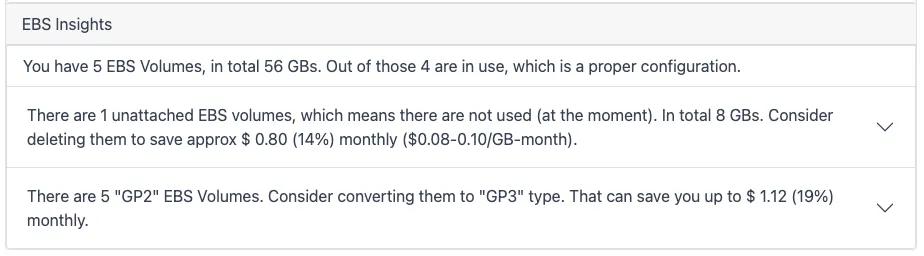
Section titled “What it checks”- Unattached EBS volumes — storage left behind after an instance was terminated but its volumes were not.
- Volumes attached to stopped EC2 instances — the instance stopped billing for compute, but every attached volume kept billing at the full rate. CloudPouch lists all volumes per stopped instance, not just the first one, and includes each in the savings summary.
- Volume type and provisioning recommendations — the EBS Volume Type Advisor (added in
v1.48.0) analyzes every attached volume against 14 days of real CloudWatch usage and recommends the most cost-effective volume type and provisioning acrossgp2,gp3,io1,io2,st1,sc1, and legacy Magnetic volumes.
Savings estimates use regional EBS pricing.
The EBS Volume Type Advisor
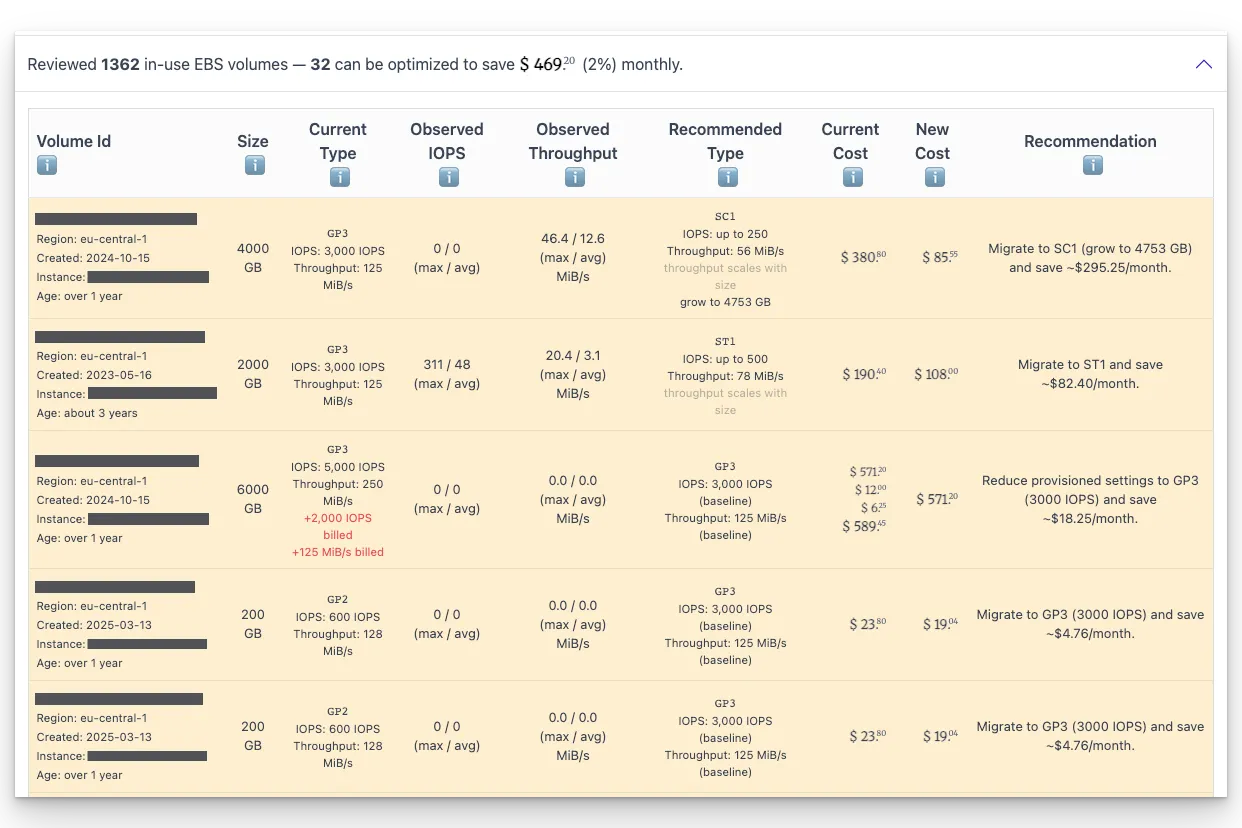
Section titled “The EBS Volume Type Advisor”EBS is billed on three separate dimensions — capacity, provisioned IOPS, and provisioned throughput — so it is easy to keep paying for performance a workload never uses. Instead of guessing from the volume type alone, the advisor compares provisioned IOPS and throughput against the observed peak and average usage from CloudWatch and turns two weeks of data into a concrete “switch to X” action with the estimated monthly difference.
What the advisor recommends:
- The cheapest feasible volume type for the observed workload — including a move to Throughput Optimized HDD (
st1) or Cold HDD (sc1) when the access pattern is sequential and IOPS are low. - Right-sizing within the same type — for example, lowering provisioned IOPS or throughput on a
gp3,io1, orio2volume without changing the type. - GP2-to-GP3 conversion, surfaced even before CloudWatch data is available, since
gp3is cheaper per GB and can be configured to matchgp2’s guaranteed performance. - Migration away from legacy Magnetic (
standard) volumes. - Cold storage for idle volumes — a volume that is effectively idle (peak of 50 IOPS or less) can be recommended
sc1/st1outright. This is where the big wins hide: an idle 2,580 GiB GP3 volume provisioned for 6,450 IOPS and 250 MiB/s drops from about $228/month to about $38/month onsc1(release-note example,v1.48.1).
Each row shows the attached EC2 instance, observed IOPS and throughput (max/avg), the recommended type and provisioning, and a breakdown of the current cost into storage, provisioned IOPS, and provisioned throughput. CloudPouch also distinguishes a genuinely idle volume from one whose CloudWatch metrics could not be fetched, so “no data” is not silently treated as “no usage”.
Why this costs money
Section titled “Why this costs money”EBS billing is tied to provisioned capacity and performance, not use. A 100 GB volume attached to a stopped instance costs the same as one serving production traffic; an unattached volume costs the same as an attached one; provisioned IOPS bill whether the workload issues them or not. None of this shows up as an error or an alarm — it just sits in the EBS:VolumeUsage lines of your bill indefinitely.
At scale these numbers get serious. In a real account analyzed in 2021/2022, CloudPouch found that converting roughly 17,000 GP2 volumes — about $100,000/month of GP2 spend — to GP3 would save $18,890/month; read the GP2-to-GP3 case study for the full analysis and migration steps.
How to read the result
Section titled “How to read the result”Unattached volumes are the safest wins — confirm nothing plans to remount them, snapshot if in doubt, delete. For stopped-instance volumes, decide whether the instance must stay restorable; if so, replacing volumes with snapshots keeps the restore path while cutting most of the storage cost. For advisor recommendations, start with idle volumes and HDD moves (largest per-volume savings), then GP2-to-GP3 conversions, then within-type provisioning trims — the EBS right-sizing guide walks through the workflow and the checks to make before changing production volumes.
Required AWS permissions
Section titled “Required AWS permissions”CloudPouch uses EC2 read APIs for volume and attachment metadata, CloudWatch metrics for the Volume Type Advisor’s usage analysis, plus cost data for savings estimates. See AWS permissions.