CloudWatch Cost Insights
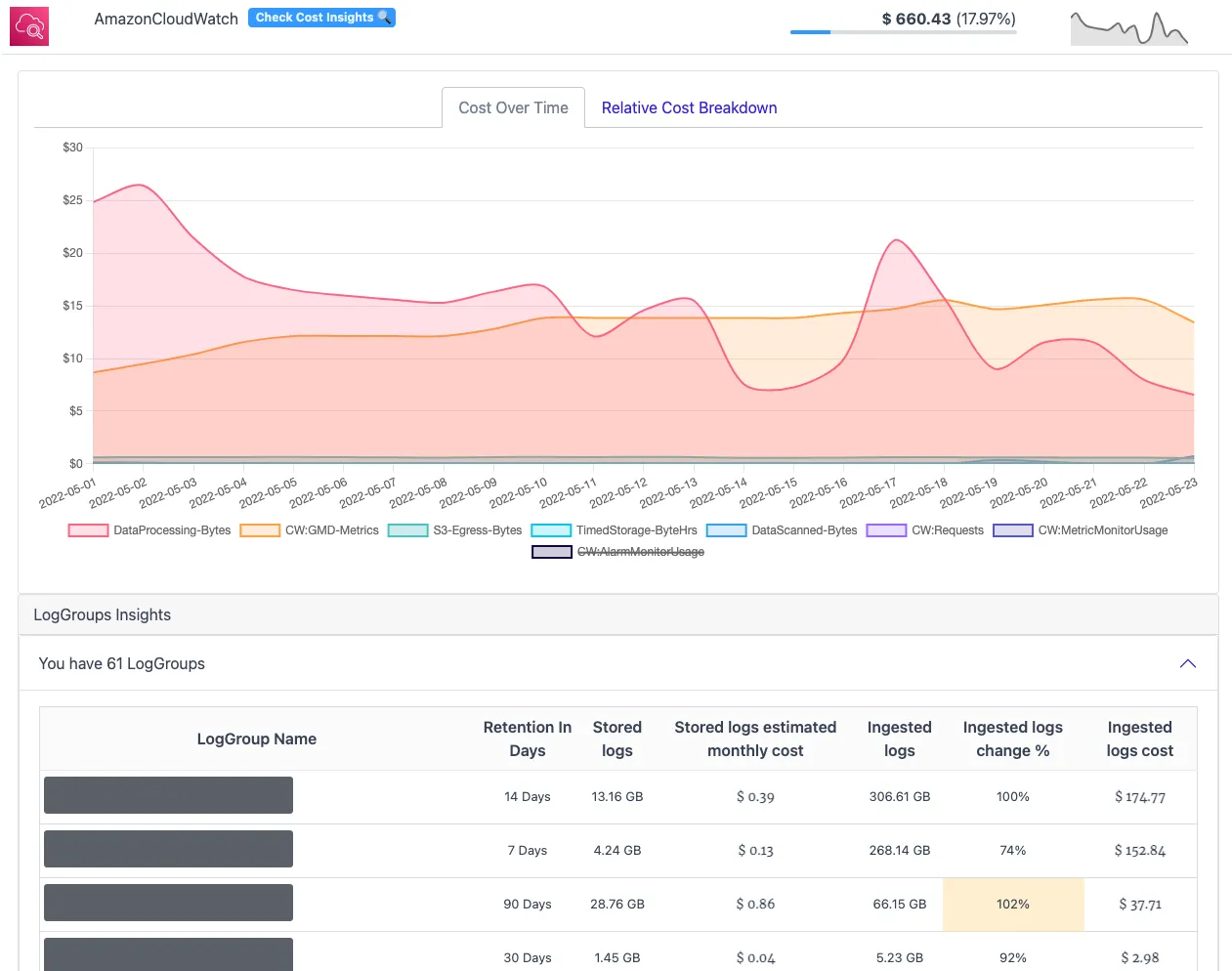
CloudWatch Logs never expire by default: every log group created without an explicit retention setting keeps its data — and bills for it — forever. CloudPouch CloudWatch Cost Insights break the CloudWatch bill down to individual log groups, separating what you pay to ingest logs from what you pay to keep them.
What CloudPouch checks
Section titled “What CloudPouch checks”- Storage cost per log group, with retention settings and stored volume.
- Ingestion cost per log group, including how ingestion is changing over time.
- Excessive or unnecessary log groups that deserve retention changes or removal.
- Usage type descriptions for CloudWatch cost rows, so generic or unknown usage lines get a readable explanation during investigation.
Why this costs money
Section titled “Why this costs money”CloudWatch Logs has two separate meters, and they need different fixes:
- Ingestion bills per GB at write time. This is usually the larger charge, and its price point surprises people — ingesting a GB of logs costs several times more than storing that GB for a month. A debug-level logger left on in production, or a chatty Lambda logging every event payload, drives this meter. Reducing it means logging less, not deleting old data.
- Storage bills per GB-month for retained data. Since the default retention is Never expire, log groups created by frameworks, CDK stacks, or Lambda itself accumulate years of logs nobody will read. Setting retention to 30 or 90 days stops the growth; it does nothing about ingestion.
Current rates are on the Amazon CloudWatch pricing page.
How to read the result
Section titled “How to read the result”The ingestion-change percentage is the early-warning column: a log group whose ingestion jumped this month points to a code or traffic change worth investigating now, before a full month bills at the new rate. High storage with Never expire retention is the slow leak — cheap per month, but permanent and compounding. Fix the loud ingesters first, then sweep retention settings account-wide.
When to use it
Section titled “When to use it”The classic trigger is the incident that ended weeks ago: verbose logging enabled for debugging and never turned off. Beyond that, reach for this insight when the CloudWatch line grows without an obvious cause, or as a periodic retention audit — most accounts have never had one.
Required AWS permissions
Section titled “Required AWS permissions”CloudPouch needs read-only access to CloudWatch Logs metadata, CloudWatch metrics where used, and cost data. See AWS permissions.