S3 Cost Insights
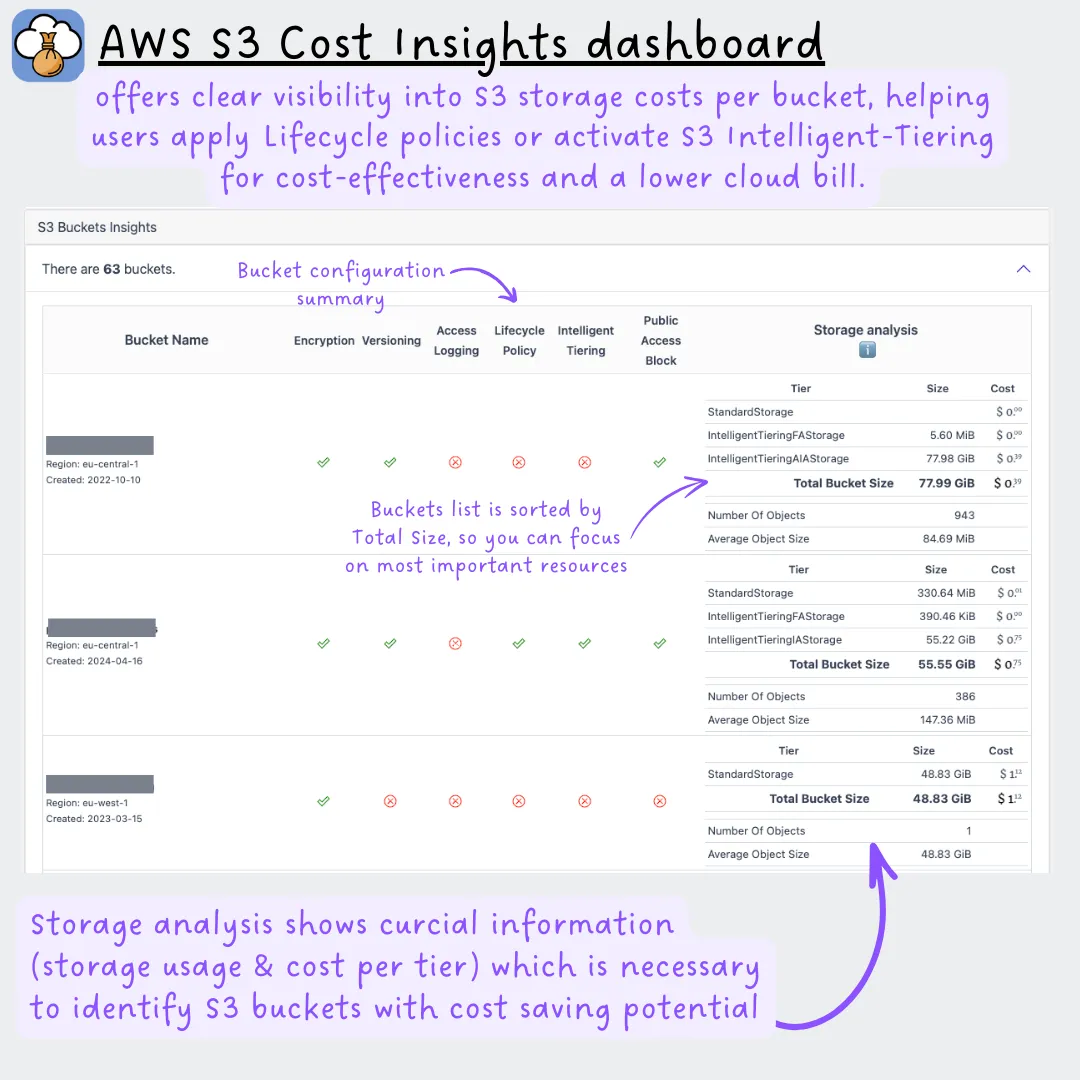
Most S3 waste comes from one default: objects land in the Standard storage class and stay there forever unless a lifecycle rule moves them. CloudPouch S3 Cost Insights show each Amazon S3 bucket’s storage class mix and average cost per GB, then point out where a lifecycle policy or Intelligent-Tiering would cut the bill.
What it checks
Section titled “What it checks”Per bucket, CloudPouch reports:
- Storage broken down by tier, so you can see how much data sits in Standard versus cheaper classes.
- Average storage cost per GB — a quick way to spot buckets paying Standard rates for archive-like data.
- Lifecycle policy opportunities, where old objects could move to a cheaper class automatically.
- Intelligent-Tiering opportunities, with a logical breakdown showing how much Intelligent-Tiering the bucket already uses.
- Links to the AWS S3 console and pre-built CloudWatch graphs, so you can watch storage class movement over time.
Where the data supports it, CloudPouch names a single next best action for the bucket — lifecycle rule review or Intelligent-Tiering — rather than listing every theoretical option. Buckets CloudPouch cannot inspect are flagged as uninspected instead of being counted as clean.
Why this costs money
Section titled “Why this costs money”S3 bills per GB-month at the rate of each object’s storage class, and Standard is the most expensive of the general-purpose classes where most data lands. The pricing gap between tiers is large — infrequent-access classes cost roughly half of Standard per GB, and Glacier-family classes a small fraction of it (see the S3 pricing page for current rates). Logs, exports, and old build artifacts are the classic offenders: written once, read never, billed at Standard for years. Nothing in AWS moves them for you — a lifecycle rule or Intelligent-Tiering has to be configured per bucket, which is exactly the gap this insight looks for. Mind the transition gotchas before writing rules: per-object transition request fees, a 30-day minimum storage duration, retrieval fees, and a 128 KB minimum billable size in the infrequent-access classes mean lifecycle rules pay off for large objects, not millions of tiny ones.
When to use it
Section titled “When to use it”Run this insight when S3 spend grows steadily without a matching workload change — the signature of accumulating Standard-class data — or as a periodic check that new buckets got lifecycle rules. It’s also the fastest way to answer “which of our few hundred buckets is actually worth optimizing?”
Required AWS permissions
Section titled “Required AWS permissions”CloudPouch needs read access to S3 storage data, CloudWatch metrics where available, and cost data. See AWS permissions.